MetroList Nightly Build: Download, Safety, and Stable vs Nightly
A MetroList Nightly build can include fixes before the stable release. This guide explains how to identify the official GitHub Actions artifact, install it cautiously, and return to stable v13.6.3 when reliability matters.


In this guide
What Is MetroList Nightly?
MetroList Nightly is a pre-release build of the open-source Android music project. It is created from the project's current development workflow, so it may contain a fix or change that has not yet been packaged into the next stable release. The word Nightly describes the release channel, not a separate app and not a premium or modified APK.
That distinction matters on download sites. A page promising a special Nightly APK can simply be reusing the name to push an unverified file. The reliable path is to start at the official MetrolistGroup/Metrolist repository, follow its Nightly build reference, and inspect the GitHub Actions artifact before installing.
As of August 2, 2026, the latest verified stable release checked for this guide is v13.6.3, published August 7, 2026. Stable is the sensible default for a primary phone, Android Auto, or offline listening. Nightly is better treated as a test channel for users who can tolerate regressions and know how to return to a stable release.
The practical rule
Choose Nightly to test a specific fix or feature; choose stable when dependable playback and simple recovery matter more than early changes.
Stable Release vs Nightly Build
The right choice depends on the job. A Nightly build may be newer, but newer does not automatically mean safer or more reliable. Compare the channel before you replace an installation that already works.
| Build channel | Best for | Main trade-off | Verification point |
|---|---|---|---|
| Stable v13.6.3 | Daily listening, Android Auto, and offline use | Fixes arrive later | Official GitHub release asset |
| MetroList Nightly | Testing a recent fix or development change | Possible bugs, changed behavior, or a short-lived artifact | Official repository and GitHub Actions workflow |
| Random mod or mirror APK | No legitimate use case for source verification | Unknown changes, stale files, or misleading download flow | Do not treat a mirror as first-party proof |
How to Get the Official MetroList Nightly Build
The official README points users toward a Nightly artifact generated by GitHub Actions. That artifact is delivered through GitHub's build system, not through a permanent APK URL owned by this website. A resolved artifact can use a temporary signed address, so do not copy that final URL into bookmarks, posts, or download buttons.
Use the workflow page below as the stable starting point. Open the most recent successful build, download the artifact offered by that run, and keep the ZIP until you have inspected its contents. The artifact name can change as the project workflow changes; a fixed filename is not proof that a file is current.
- Open the official workflow — Use the Metrolist repository's build workflow, which remains a stable GitHub page even when an artifact URL expires.
- Choose a successful run — Prefer the latest completed run with a normal workflow status. Do not install a half-finished or failed build.
- Download the artifact — Download the ZIP from that run and keep the original archive so you can identify where the APK came from.
- Inspect before installing — Extract the archive, check that it contains an Android APK, compare the project name and build context, and scan the file when your device or security tools support it.
- Keep a stable fallback — If playback, sign-in, offline cache, or Android Auto breaks, return to the official stable release instead of trying unrelated mirrors.
How to Verify a MetroList Nightly Source
The repository is the source of truth for project identity and build context. A Nightly file should be traceable to the official MetrolistGroup/Metrolist project, while the stable comparison point should be traceable to its release page.
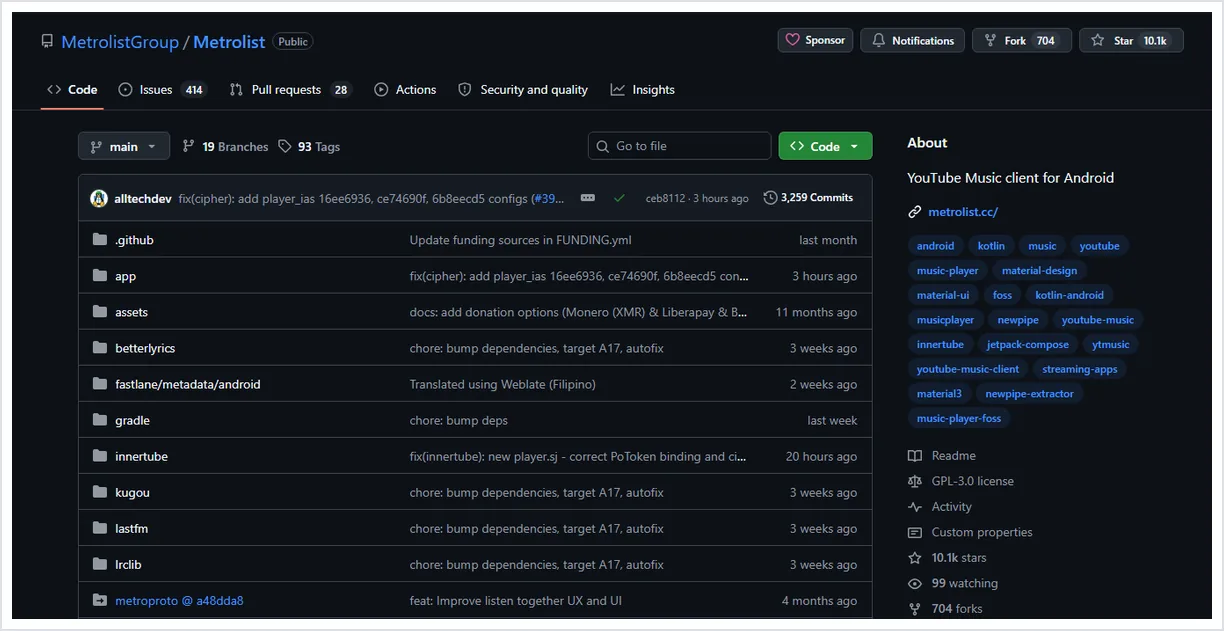
- Confirm the owner — The repository should be MetrolistGroup/Metrolist. A similarly named fork is not automatically an official build source.
- Separate Nightly from stable — A build artifact from Actions is not the same thing as the tagged v13.6.3 stable release. Keep those labels separate in your notes and backups.
- Check the file type — Android installation files should be APK assets or an official archive containing them. Be suspicious of EXE installers, browser extensions, or configuration profiles.
- Compare release context — The stable release checked on August 2, 2026 is v13.6.3. If a page calls an older file the newest build, stop and compare it with the official release history.
- Reject forced downloads — Surveys, notification permission traps, password-protected archives, and fake update buttons are reasons to leave the page, not steps in the official flow.
For repository checks that apply to every MetroList APK, read the MetroList GitHub verification guide.
Install and Roll Back a Nightly Build Safely
Treat a Nightly install as a test, not as a routine one-click update. Before changing a working app, save important playlist information and note the stable version you can return to. A Nightly build may use the same Android package identity as stable, which means replacing it can affect the app data already on the device.
If the build does not install, Android reports a signature conflict, or playback becomes unreliable, do not keep stacking random APKs. Record the problem, remove only what you understand, and reinstall the verified stable asset from the official release page. If your local data matters, check the project's backup options before uninstalling.
- Test on a secondary device when possible — A spare Android phone or emulator limits the impact of a regression on your daily listening setup.
- Keep the stable release reference — Save the official v13.6.3 release page, not a temporary signed asset URL, as your recovery reference.
- Install only after inspection — Use Android's normal APK installation flow and review the source and permissions before opening the app.
- Test one thing at a time — Check playback, search, background audio, downloads, and Android Auto separately so a regression is easier to describe.
- Rollback deliberately — If stable is needed again, use the official stable release and follow Android's prompts carefully; do not mix in a modded build.
For a broader APK risk review, use the MetroList safety guide.
Who Should Use MetroList Nightly?
Nightly is useful when you have a specific reason to test it. It is not a better default simply because it is newer.
| User situation | Recommendation | Why |
|---|---|---|
| You need dependable daily playback | Stay on stable | A regression can affect music, downloads, or car use. |
| You can reproduce a bug and want to test a fix | Consider Nightly | The build channel may contain the relevant change earlier. |
| You only found a random Nightly APK page | Do not install it | The label is not evidence of official origin. |
| You use Android Auto for driving | Test away from the car first | Reliability and distraction risk matter more than early features. |
| You are comfortable reading GitHub workflow context | Nightly may fit | You can verify the run, artifact, and rollback path yourself. |
MetroList Nightly FAQ
Official resources to verify
- MetroList official repository — Project identity, README, source code, issues, and workflow links.
- MetroList GitHub Actions build workflow — Stable starting point for completed Nightly runs and their artifacts.
- MetroList stable release v13.6.3 — Verified stable comparison release published August 7, 2026.
- MetroList README Nightly reference — First-party README that documents the Nightly build entry point.
Updated August 2, 2026