Is MetroList Music App Safe? 9 Checks Before You Install
MetroList is an open-source Android music client, but safe installation still depends on where you download the APK, which file you choose, and how you review permissions before signing in.

In this safety guide
Is MetroList Safe to Install?
MetroList is safer to evaluate than many random APKs because the project is open source and has a public GitHub repository. That transparency lets you inspect the source, release history, issues, and community activity instead of trusting a single anonymous download button.
That does not mean every file using the MetroList name is safe. Android APK safety depends on the exact file you install. A mirror can be stale, a fork can be modified, and a website can package unrelated installers around a popular app name. Treat MetroList as a project you can verify, not as a word that makes every download trustworthy.
For most users, the safest practical path is simple: start from the official GitHub project or a well-known APK repository, compare the version and file type, install only the Android APK, and keep the app updated from the same source. If a page asks for surveys, browser extensions, Windows EXE files, or password ZIPs, leave it.
Practical verdict
Use MetroList only from a verifiable APK source. Do not install files that cannot be traced back to the official GitHub project or a reputable Android APK repository.
9 MetroList APK Safety Checks Before Installing
Run through this checklist before you install MetroList on a phone, tablet, emulator, or Android Auto device.
| Check | Pass signal | Risk signal |
|---|---|---|
| Project source | Points to MetrolistGroup/Metrolist or a reputable mirror | No clear source, copied branding, or vague download page |
| File type | Android APK file for an Android device | EXE, DMG, PKG, password ZIP, browser extension, or installer bundle |
| Version | Version and release date match current guidance | Old build presented as latest or no version shown |
| Asset name | A clear MetroList APK asset name | Random file names, extra downloader, or renamed executable |
| Permissions | Network, media, storage/cache, notifications, account sync if used | SMS, call log, device admin, accessibility, or unrelated permission pressure |
| Install path | Installed directly through Android package installer | Forced through a separate installer app |
| Update path | Same trusted source every time | Jumping between unknown mirrors for a newer-looking build |
| Account behavior | Optional sign-in only when you need sync | Page claims you must share credentials before installing |
| Community signals | Recent releases, issues, and visible project activity | No changelog, no repository trail, or fake comments |
Where Should You Download MetroList APK Safely?
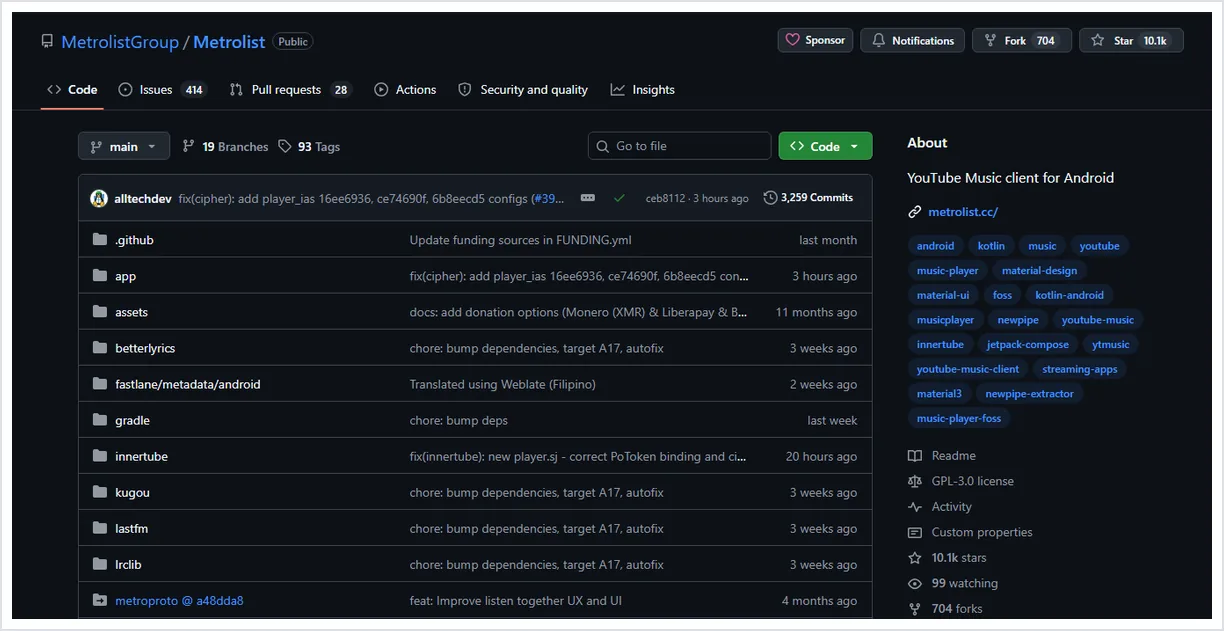
The official GitHub project is the first verification point because it ties the app name to source code, releases, issue history, and maintained files. If you use another site, compare its version, file name, and description with the GitHub project before installing.
A reputable APK repository can be convenient, especially when it keeps a version history and identifies the package clearly. Even then, do not skip basic checks. Confirm that the file is an APK, that it is not wrapped in a downloader, and that the page does not promise a desktop edition that the official project does not publish.
This site provides installation guidance and links. It should not replace your own source check. When safety matters, treat every download page as a claim and GitHub or a reputable repository as evidence.
What Permissions Are Normal for MetroList?
Permission prompts can vary by Android version, app version, and the features you use. The goal is to judge whether a permission fits a music player workflow.
| Permission area | Why it may appear | How to judge it |
|---|---|---|
| Network access | Streaming music, search, lyrics, account sync, updates | Expected for any streaming music app |
| Storage or media | Cache, offline downloads, playlist import/export | Expected when you use offline or local file features |
| Notifications | Playback controls on the lock screen or notification shade | Reasonable if you want media controls |
| Account sign-in | Optional YouTube Music sync or library features | Use only if you understand the account tradeoff |
| Background activity | Music playback while the screen is off | Expected for a player, but review battery settings |
| Accessibility, SMS, calls, device admin | Not normally needed for music playback | Stop and investigate before granting |
Warning Signs That a MetroList Download Is Not Safe
The most suspicious pages are the ones that make MetroList look like a native Windows or iPhone installer. MetroList APK is an Android package. A Windows EXE, macOS installer, configuration profile, or iOS APK claim should be treated as unrelated unless the official project clearly says otherwise.
Another warning sign is pressure. A safe Android app download should not require survey gates, unrelated browser extensions, password-protected archives, or instructions to disable antivirus protection. Those steps add risk without helping you install the actual APK.
Be cautious with pages that promise special unlocked builds, permanent premium fixes, or playback repair APKs. If a fix is real, it should be visible in the release notes or issue discussions. If only an anonymous mirror claims it, wait or verify through GitHub first.
- MetroList PC.exe - Use the PC guide and an Android emulator instead of a native Windows installer claim.
- MetroList iOS APK - APK files are for Android. iPhone claims need a different verification standard.
- Unlocked or modded build - Modified APKs may change permissions, signing, or behavior.
- Survey or password archive - A real APK download should not need these steps.
Safe Update Routine for MetroList
Do not chase every page that says it has a newer MetroList APK. First check the official release source, then install the new APK over the existing app when Android allows it. Staying on one trusted update path reduces the chance of mixing packages from different maintainers.
Before major updates, note your important playlists, settings, and offline library state. An over-install usually preserves more data than deleting the app first. If you must clear data, do it only after cache cleanup and source verification fail to solve the issue.
If MetroList stops working after an update, compare GitHub issues and release notes before downgrading. A temporary playback issue can affect many users at once, and random downgrade APKs may be less safe than waiting for a maintained fix.
What About MetroList Download Location?
The phrase MetroList download location can mean two different things: where to download the APK from, or where offline music/cache files live after installation. For safety, the APK download location should be a trusted source such as the official GitHub release path or a reputable APK repository.
The offline cache location is different. Android apps store cached media inside app-controlled storage, and some emulators place that data in a virtual Android disk. Do not move or edit those files manually unless MetroList exposes an in-app option. If offline playback is your main issue, use the offline mode guide instead of reinstalling from a random mirror.
In short: verify the APK source before installation, then manage downloaded songs through MetroList's own controls after installation.
MetroList Safety FAQ
Useful verification sources
- MetroList GitHub repository - Official source code, README, issues, releases, and project activity.
- MetroList GitHub releases - Use release assets and dates to verify APK files before installing.
- Android app permissions help - Google guidance on reviewing app permissions before and after installation.
Updated July 2026