MetroList GitHub: How to Verify the Official Project Before Downloading
The official MetroList GitHub repository is the safest place to verify source code, releases, issues, and APK files before you install MetroList on Android. This guide shows what to check and what warning signs to avoid.

In this guide
What Is the Official MetroList GitHub Repository?
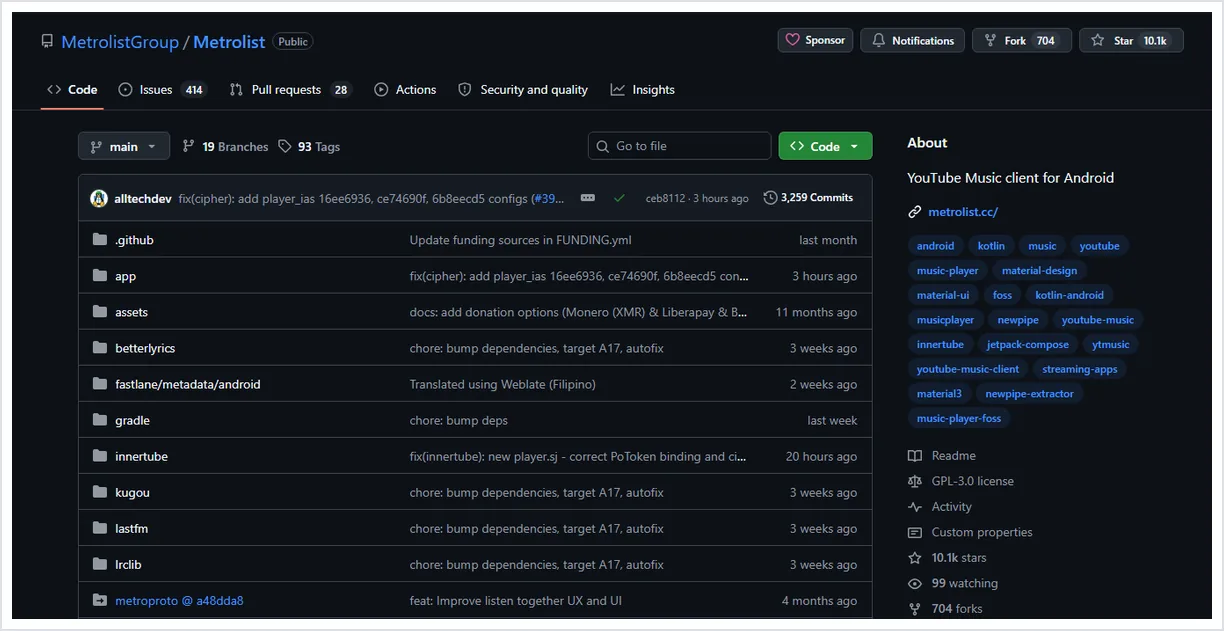
The official MetroList project is published on GitHub under MetrolistGroup/Metrolist. That repository is the primary place to confirm the source code, release history, development activity, issue discussions, and official APK assets. If a download page claims to offer MetroList but does not reference that project, treat the claim as unverified until you can compare it with GitHub.
A GitHub repository does not automatically make every third-party APK safe, but it gives you a transparent baseline. You can see whether the app is active, whether releases are attached to the same project, and whether the files match the names and timing described by the maintainers.
The safest workflow is to use this website for plain-language installation guidance, then use GitHub as the verification source for release details. That combination helps you avoid fake MetroList APK pages, renamed files, outdated mirrors, and modded builds that are not connected to the official project.
Verification baseline
Official source first, mirror second. If a MetroList APK file cannot be traced back to MetrolistGroup/Metrolist releases, do not treat it as the official build.
How to Verify a MetroList GitHub Release
Before installing any MetroList APK, compare the download page against these release checks. The exact version can change, so the process matters more than memorizing one number.
| Check | What to look for | Why it matters |
|---|---|---|
| Repository owner | MetrolistGroup/Metrolist | Fake pages often use similar names but different owners. |
| Release page | A recent release with dated notes and APK assets | A real project should show version history, not only a single download button. |
| Asset names | Files such as Metrolist.apk or official variants | Random names, password archives, and installer EXE files are warning signs. |
| Publish date | A date that matches the changelog or site guidance | Old files may miss security and compatibility fixes. |
| File type | APK for Android, not ZIP surveys or profile installers | MetroList is an Android app; unrelated packages increase risk. |
| Latest verified version | Latest GitHub release verified on July 25, 2026: v13.6.1, published July 17. Standard Metrolist.apk is about 24.1 MB; the Google Cast build is about 25.7 MB. This maintenance release improves playback recovery and fixes startup, login, backup restore, Android Auto, and sleep timer problems. | Helps compare mirrors against the official release before installing. |
Which MetroList GitHub APK File Should You Download?
GitHub releases can contain more than one APK asset. The standard APK is usually the best choice for most Android phones and tablets. Variant builds may add optional features, use a different signing/distribution channel, or target a particular store workflow. Do not download every asset just because it is listed.
Choose the simplest file that matches your device and feature need. If you only want the normal MetroList Android app, start with the standard MetroList APK. If a release lists a Google Cast build, understand that it may be larger because it includes extra casting-related components. If a release lists an Izzy-style build, it may be intended for that distribution path.
After downloading, keep the original file name visible until installation is complete. Renaming files makes it harder to compare them later if you need support or want to check whether you installed the official build.
Standard APK
Best default choice for most Android users who only need the normal MetroList app.
Google Cast variant
Useful only if you specifically need the release variant that includes casting support.
Distribution-specific variant
Use only when you understand why that variant exists and where it is expected to be installed from.
Windows or PC searches
If you searched MetroList GitHub Windows, use GitHub only to verify the APK asset, then follow the PC guide for emulator installation.
MetroList GitHub Safety Checklist
Use this checklist whenever you compare a GitHub release, APK mirror, or download article.
For a broader install-risk checklist beyond release verification, use the dedicated safety guide: MetroList safety guide
- Confirm the repository - The source should point to MetrolistGroup/Metrolist, not a lookalike project.
- Read the release notes - A credible release should show version context, date, and assets that make sense for Android.
- Avoid account traps - A MetroList APK download should not require surveys, browser extensions, unknown profiles, or unrelated desktop installers.
- Scan before installing - Use Android Play Protect or a reputable scanner if you downloaded the APK outside GitHub.
- Review permissions - If an APK asks for permissions unrelated to music playback, storage, notifications, or network access, stop and investigate.
What the MetroList Source Code Can Tell You
The source code is useful even if you are not a developer. Repository activity shows whether a project is maintained, issues reveal common bugs, and pull requests show what kind of changes are being discussed. That context helps you judge whether a download page is current or simply copying old MetroList keywords.
For technical users, the code can also help confirm app permissions, dependencies, build configuration, and feature direction. This does not replace runtime security review, but it is better than trusting an APK file with no visible development history.
If you report a bug, check the GitHub issues first. Someone may already have documented the same login, playback, Android Auto, offline cache, or regional availability problem. Reading existing issues can save time and prevent you from reinstalling random APK copies that will not solve the underlying problem.
Warning Signs of Fake MetroList GitHub or APK Pages
Be careful with pages that use phrases like unlocked premium, no verification, iOS APK, Windows EXE, or mandatory installer. Those claims often target people searching for the official MetroList GitHub project but redirect them to unrelated downloads.
A trustworthy page should make it easy to reach the official repository and should explain what it does and does not host. This site provides guidance and links; it does not need to hide the GitHub project behind redirects or force you through extra offers.
When in doubt, close the download page and search the repository directly on GitHub. A few seconds of verification is safer than installing a file that only borrowed the MetroList name.
MetroList GitHub FAQ
Official resources to verify
- MetroList GitHub repository - Official project source, README, issues, and development activity.
- MetroList GitHub releases - Official release history and APK asset list.
- GitHub documentation on releases - Explains how GitHub releases package versioned project assets.
Updated July 2026