Best MetroList Alternatives: 7 Android Music Apps Compared
MetroList is a strong open-source YouTube Music client, but it is not the only option. This guide compares realistic alternatives by source safety, offline behavior, Android Auto support, account needs, and who should use each app.

In this guide
What Is the Best MetroList Alternative?
If you like MetroList because it is open source, lightweight, and focused on YouTube Music, the closest alternatives are InnerTune and RiMusic. They follow a similar Android-first, music-client pattern and feel familiar to users who do not want a full commercial streaming app.
If your goal is a broader free music app with a Spotify-like interface, Spotube is the stronger comparison. It is open source, works across more platforms, and is often searched as an open source Spotify alternative. The tradeoff is that its workflow is not identical to MetroList, so playlist behavior and music sources may differ.
If reliability, casting, family accounts, official downloads, or customer support matter most, the official YouTube Music and Spotify apps are still safer than any third-party APK. They cost more when you need premium features, but they reduce breakage and security uncertainty.
Best practical answer
Stay with MetroList if you mainly want an Android YouTube Music client with ad-free playback and offline support. Compare alternatives only when you need a different platform, account model, privacy stance, or official subscription reliability.
MetroList Alternatives Compared
This table separates true MetroList replacements from broader music apps. A good alternative should match your actual job: streaming, offline listening, Android Auto, privacy, playlist migration, or official reliability.
| App | Best fit | Open source | Offline playback | Main tradeoff |
|---|---|---|---|---|
| Spotube | Users who want a cross-platform, Spotify-style open-source music client | Yes | Varies by source and setup | Not a direct MetroList clone; library and source behavior differ. |
| InnerTune | Android users who want another YouTube Music client | Yes | Usually supports local/offline workflows depending on build | Availability and maintenance can change; verify the current repository. |
| RiMusic | Users who want a community-maintained YouTube Music front end | Yes | Supported in many builds | Forks and release pages can confuse new users. |
| NewPipe | Privacy-first users who avoid account login | Yes | Download/local playback workflows are a core use case | Less music-library polish than a dedicated music client. |
| SimpMusic | Users exploring lightweight YouTube Music-style clients | Often community/open-source oriented | Depends on current build | Check release freshness and source legitimacy before installing. |
| Official YouTube Music | Users who want the most stable YouTube Music experience | No | Premium required for official offline use | Ads/subscription limits without Premium. |
| Spotify | Users who prefer official catalog, social sharing, and device continuity | No | Premium required for offline use | Not a YouTube Music client and not open source. |
How to Choose the Right Alternative
Start with the reason you are leaving MetroList. If the app works well on your Android phone, switching only because another keyword looks related can make your setup worse. Most alternatives trade one strength for another: more platforms, more official reliability, stronger privacy, or a more familiar Spotify-style library.
For Android-only listening, compare MetroList with InnerTune, RiMusic, and NewPipe first. For desktop and multi-platform use, Spotube or official apps usually make more sense. For car playback, test Android Auto behavior before committing, because unofficial apps can change behavior after Android, YouTube, or app updates.
- Choose Spotube when - you want an open-source Spotify alternative that also works beyond Android and you accept that it is not a MetroList-style APK clone.
- Choose InnerTune or RiMusic when - you want a similar Android YouTube Music client and are comfortable verifying GitHub releases before each install.
- Choose NewPipe when - privacy, no-login playback, and simple downloads matter more than a polished streaming-library interface.
- Choose official apps when - you need the lowest maintenance path, predictable offline downloads, casting, family plans, and official support.
Safety Checks Before Installing Any Music APK
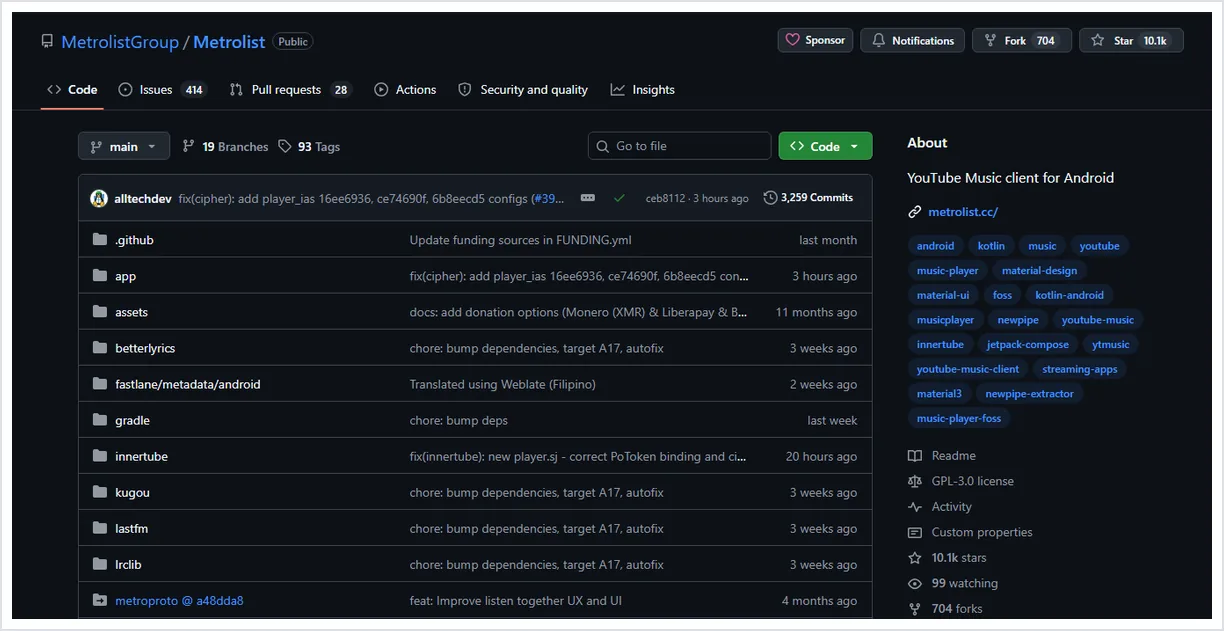
Treat every MetroList alternative as a software-install decision, not just a feature list. Download pages, clones, and APK mirrors can use similar names while shipping unrelated files. The safest route is to verify the official project page, release history, package name, and file size before installing.
A useful comparison page should not push you toward random mod APKs. Queries such as YouTube Music mod APK have high search volume, but that intent often points to cracked or repackaged apps. For this site, those terms are better treated as risk education rather than a recommendation.
- Check the source - Prefer official GitHub releases, official stores, or the developer site. Avoid reuploaded files that hide the original project.
- Check maintenance - Look for recent releases, issue activity, and clear changelogs. A dead project can break after a YouTube or Android update.
- Check permissions - A music app should not ask for unrelated SMS, contact, or accessibility access unless the project explains why.
- Check update path - Use the same trusted source for future updates so you do not mix package variants.
Moving Playlists, Downloads, and Habits
MetroList alternatives rarely share one perfect migration path. Playlists, local downloads, caches, and account libraries depend on the source service and the app architecture. Before switching, export or record the playlists you care about, then test a small set in the new app.
If you mainly use Spotify playlists, read the MetroList playlist import guide before switching apps. If you use offline mode heavily, test download storage, background playback, and refresh behavior before deleting your MetroList setup.
- MetroList playlist import guide - Use this guide if your main concern is moving Spotify playlists into a MetroList-style workflow.
- MetroList offline mode guide - Use this guide to compare offline limitations before switching to another app.
- MetroList GitHub verification guide - Use this guide to verify release sources for MetroList and similar open-source music apps.
When You Should Keep MetroList
Keep MetroList if your current setup already solves the job: Android playback, YouTube Music access, offline listening, lyrics, playlist control, and no subscription. A broader alternative keyword does not automatically mean a better daily app.
A new app is worth testing when you need a platform MetroList does not serve well, when a release breaks on your device, when you want a different account model, or when you prefer official paid reliability over third-party flexibility.
MetroList Alternatives FAQ
Sources and verification
- MetroList official GitHub repository - Used to verify MetroList project scope, open-source status, and release path.
- MetroList official releases - Check the current APK version before installing.
Updated June 2026