MetroList Lyrics: How to Show Lyrics and Fix Missing Text
Use the player lyrics view, refresh online results, and troubleshoot missing or out-of-sync text without installing a random mod APK.

In this guide
How MetroList Lyrics Work
MetroList lyrics are a playback feature, not a separate lyrics website. The app identifies the current track from its title, artist, and source metadata, then asks a lyrics provider for matching text. That means the player can work perfectly while a particular song still has no lyrics result: the provider may not have the track, the metadata may not match, or the result may be unavailable in that moment.
The most useful distinction is between a missing result and a broken player. If the song plays and the Lyrics control is visible but the panel is empty, focus on metadata, network access, and provider refresh. If the whole app cannot search or play music, use the broader MetroList not working guide instead of treating every playback error as a lyrics bug.
Search demand also mixes two related phrases: MetroList lyrics and MetroList search online lyrics. The first asks where the lyrics view is; the second usually asks why an online lookup, refresh, or provider response is needed. This guide covers both without promising that every song has synchronized lyrics.
How to Open MetroList Lyrics
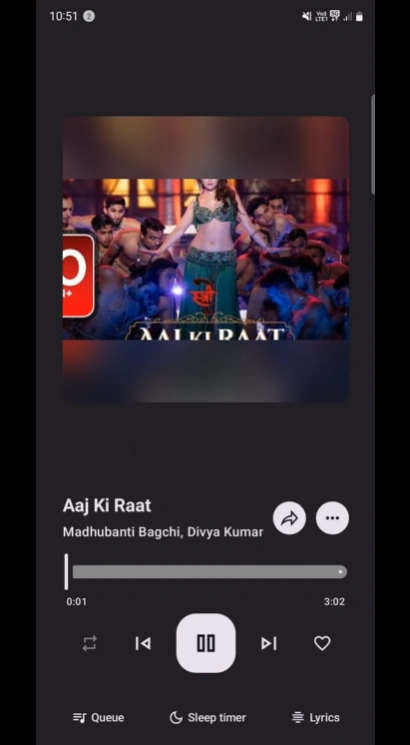
Use a normal song first rather than a rare upload or a track with unusual punctuation. Let the audio start, open the expanded player, and look for the Lyrics control near the playback actions. The exact icon position can move between releases and screen sizes, but the workflow is stable: identify the track, open the player, then request lyrics.
The player screenshot below shows the type of screen to look for. It is a site-provided MetroList interface image, while the feature image at the top is a separate illustrative concept graphic. Keep the app text as the source of truth for the current release rather than relying on a screenshot from an older build.
- Play a recognizable track — Choose a well-known song and wait until the title and artist are visible.
- Open the expanded player — Tap the current-song bar or artwork to reach the full playback screen.
- Select Lyrics — Use the Lyrics control in the player. If it opens an empty panel, continue with the online refresh checks below.
- Check the match — Compare the displayed title, artist, and album with the song you intended to play.
- Test a second song — A second result separates a provider or metadata issue from an app-wide failure.
MetroList Online Search and Lyrics Providers
The phrase MetroList search online lyrics points to an important limitation: lyrics are often fetched while the device is connected. If you are offline, the app may still play a cached song but be unable to retrieve fresh lyric text, translations, or timing data. Go online before deciding that the feature is broken.
A refresh or provider reload can help after a temporary timeout, a change in song metadata, or a provider response that arrived before the app finished loading. Do not repeatedly tap refresh on a bad match. First check the artist and title, then try a mainstream track, then retry once on a stable connection.
The table below keeps the decision practical. It also avoids a common mistake: installing a new APK because one song has no lyrics when the actual problem is a provider result or an unavailable source.
| Situation | Best next step | What it tells you |
|---|---|---|
| Lyrics panel is empty | Reconnect and refresh the online result once | The provider may need a live response. |
| Only one song is missing text | Try another version or a well-known track | The first song may have unmatched metadata. |
| Search itself returns no results | Check network access and app status | This is broader than a lyrics-only issue. |
| Text appears but timing is wrong | Compare another provider result or track version | Lyrics can exist without synchronized timing. |
| Lyrics work online but not offline | Prepare the track while connected | Offline cache may not include fresh lyric data. |
MetroList Lyrics Not Showing: Fixes That Are Safe to Try
When MetroList lyrics are not showing, change one variable at a time. Clearing all app data, installing a random mirror, or switching to an unverified mod build makes it harder to identify the real cause and can remove playlists or cached content.
Use the following order: confirm the track, confirm the network, refresh the lyrics result, test another song, then compare the installed version with the official release. If playback, search, and lyrics all fail, move to the main troubleshooting page rather than repeating a lyrics-specific fix.
- Title or artist mismatch — Open the track details and check spelling, featured artists, live/remix labels, and punctuation. A close-looking title can still return the wrong lyrics.
- Temporary provider timeout — Switch to a stable network, wait briefly, and refresh once. Avoid repeated refresh loops that only create more requests without changing the match.
- Lyrics provider needs reload — If the release exposes a provider refresh or reload action, use it after confirming the song metadata. Treat a low-volume phrase such as reload lyricsproviders metrolist as troubleshooting language, not proof that a new APK is required.
- Only one track fails — Try a popular song from the same language or artist. One missing result usually indicates coverage or metadata, not a broken installation.
- Lyrics show as plain text — The source may provide lyrics without synchronized timing. A static result is different from an empty result and may be the best available match.
- Everything stopped after an update — Check the official release notes and compare the APK tag before rolling back. Do not download a file advertised as a special lyrics fix from an unknown site.
- App data was cleared — Sign-in state, cache, and local settings may need to be rebuilt. Re-test online playback first, then request lyrics again.
Do MetroList Lyrics Work Offline?
Offline playback and offline lyrics are not the same promise. A cached song can play without a network connection while its lyric text still needs a provider lookup, fresh metadata, or local data that was not saved with the track. Prepare the song and open its lyrics while online if the words matter for a flight, commute, or low-signal trip.
Do not clear MetroList app data or use an Android cleaner just before travel. If lyric text disappears after cleanup, first reconnect and test a known track. The dedicated offline mode guide explains cache limits and why a playlist can play partly online but fail offline.
If you need permanent, portable lyric files, MetroList is not the right place to assume that every result becomes a standalone export. Treat lyrics as app-managed display data and respect the source service, local law, and artist rights.
| Use case | Likely result | Safer preparation |
|---|---|---|
| Lyrics while connected | Best chance of a fresh result | Open the player and verify the text before leaving Wi-Fi. |
| Lyrics for a cached song offline | May work, be stale, or be unavailable | Test Airplane Mode with more than one saved track. |
| New online search offline | Usually unavailable | Search and save the track while connected. |
| Lyrics after reinstall | Local display data may be gone | Rebuild cache and sign-in state from a trusted release. |
| Lyrics on an emulator | Depends on emulator network and storage | Check virtual storage and network permissions first. |
Version and Source Checks Before Reinstalling
This is a download-focused site, so the version check comes before recommending a reinstall. On August 6, 2026, the official MetroListGroup/Metrolist GitHub latest release was still v13.6.1, published July 17, 2026. The standard Metrolist.apk asset was 24,113,697 bytes, with separate Izzy and Google Cast variants also listed by the official release.
No newer stable version was found during this check. That does not prove that every mirror is current: compare the repository owner, release tag, asset name, APK type, and publication date before installing. A page that offers a MetroList lyrics fix as an EXE, password ZIP, browser extension, or survey download is not following the normal Android release format.
If the same version works for other users but lyrics fail for one track, keep the current installation and troubleshoot metadata or provider access first. If the app has broader failures, use the official release page as the durable fallback and read the GitHub verification guide before changing files.
- Check the owner — Use the MetroListGroup/Metrolist project rather than a look-alike repository or a page that hides its source.
- Check the asset — A normal Android release uses an APK asset. Do not treat an EXE or password-protected archive as a MetroList lyrics update.
- Check the tag and date — Compare the installed version with the latest release tag and publication date instead of trusting a page that only says latest.
- Keep a fallback — If you update, keep the official releases page and your current version notes so you can diagnose a regression without searching random mirrors.
MetroList Lyrics FAQ
Official sources checked
- MetroList official GitHub repository — Project scope, playback features, source code, and current documentation.
- MetroList official releases — Latest stable tag, publication date, APK names, sizes, and release assets checked on August 6, 2026.
Choose the smallest next step that matches the problem instead of reinstalling from an unverified page.